
The compact disc has been written off more times than anyone can count, and yet here it is — with sales that have levelled off rather than collapsed, used prices climbing for sought-after pressings, and a small group of manufacturers still building dedicated disc-spinning hardware. None of that makes the CD the future, but it does mean the format is worth understanding on its own terms rather than as a relic. If you are weighing whether a CD player still belongs in a modern system, the useful questions are not about nostalgia. They are about how the format works, what a player or transport is actually doing, and where the sound quality genuinely comes from.
Two Jobs Inside One Box
Every CD player performs two separate tasks, and keeping them distinct is the key to understanding the whole category. First, a mechanism spins the disc and recovers the digital data stored on it. Second, that stream of ones and zeros is converted into an analog voltage your amplifier can use. In a one-box integrated player, both jobs live in the same chassis. Split them apart and you get a transport (the reading half) feeding an external DAC (the converting half) over a digital cable.
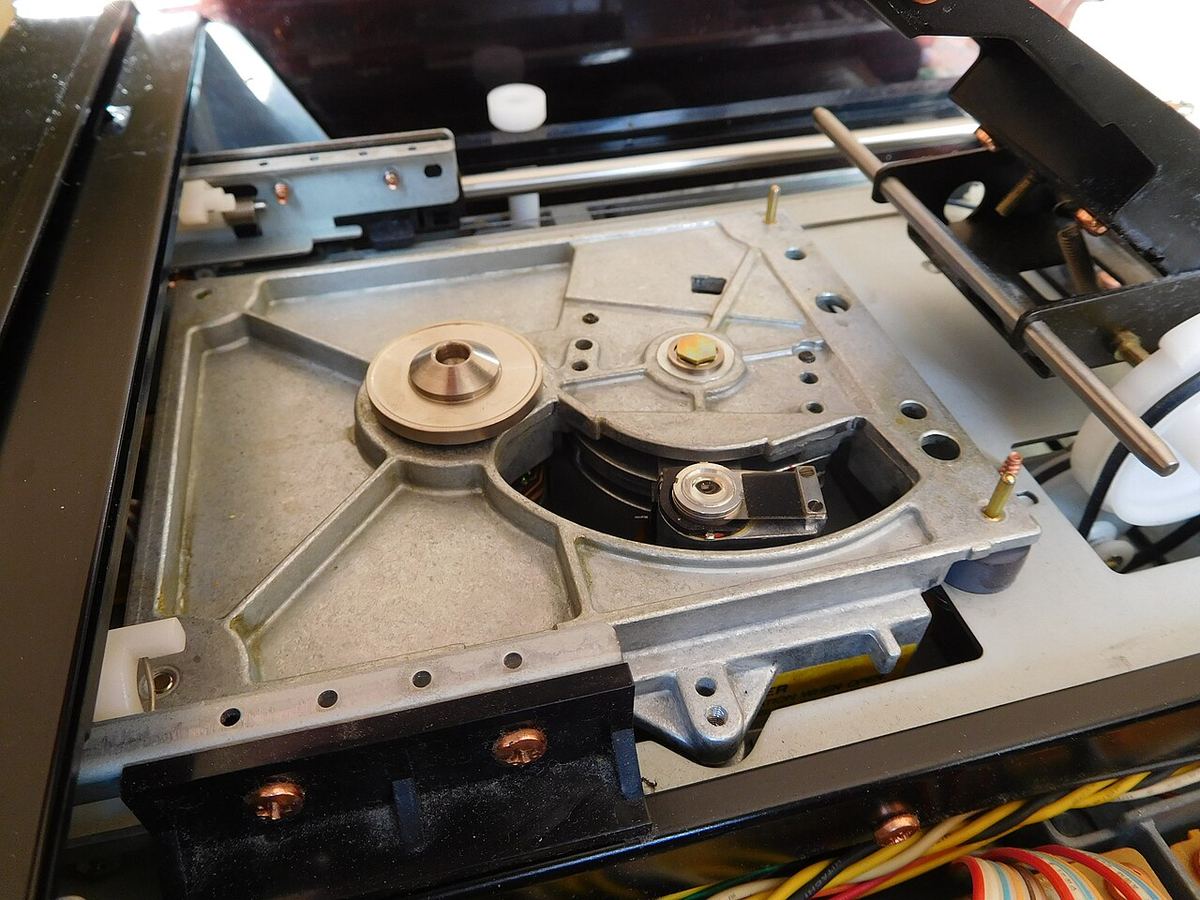
Neither arrangement is inherently superior — they suit different priorities. The integrated player is simpler, needs one interconnect, and is usually the better value at modest prices. The split approach exists because digital-to-analog conversion has kept improving, and a separate DAC lets you upgrade that half of the equation, or share one good converter across a CD transport and a network streamer, without replacing the disc mechanism you already like.
Transport + External DAC
A transport is a CD player with the conversion stage removed. It reads the disc, handles error correction, and sends a raw digital bitstream out over a digital connection — S/PDIF coaxial, TosLink optical, or AES/EBU — to a standalone DAC that does the converting. The split makes sense when you already own a DAC you value, want to feed several digital sources into one converter, or intend to upgrade conversion over time. For a single, self-contained source at a sensible price, an integrated player is usually the more sensible buy.
How a Transport Reads the Disc
A CD stores audio as a spiral of microscopic pits pressed into a reflective layer. A laser tracks that spiral, and a photodiode watches how the reflected light changes as pits and flat "land" areas pass beneath it. Those transitions are decoded into the underlying data. The disc does not simply hold raw audio samples, though — the data is wrapped in an error-correction scheme (Cross-Interleaved Reed-Solomon Coding) that spreads each sample's information across a wide physical area and adds redundancy.
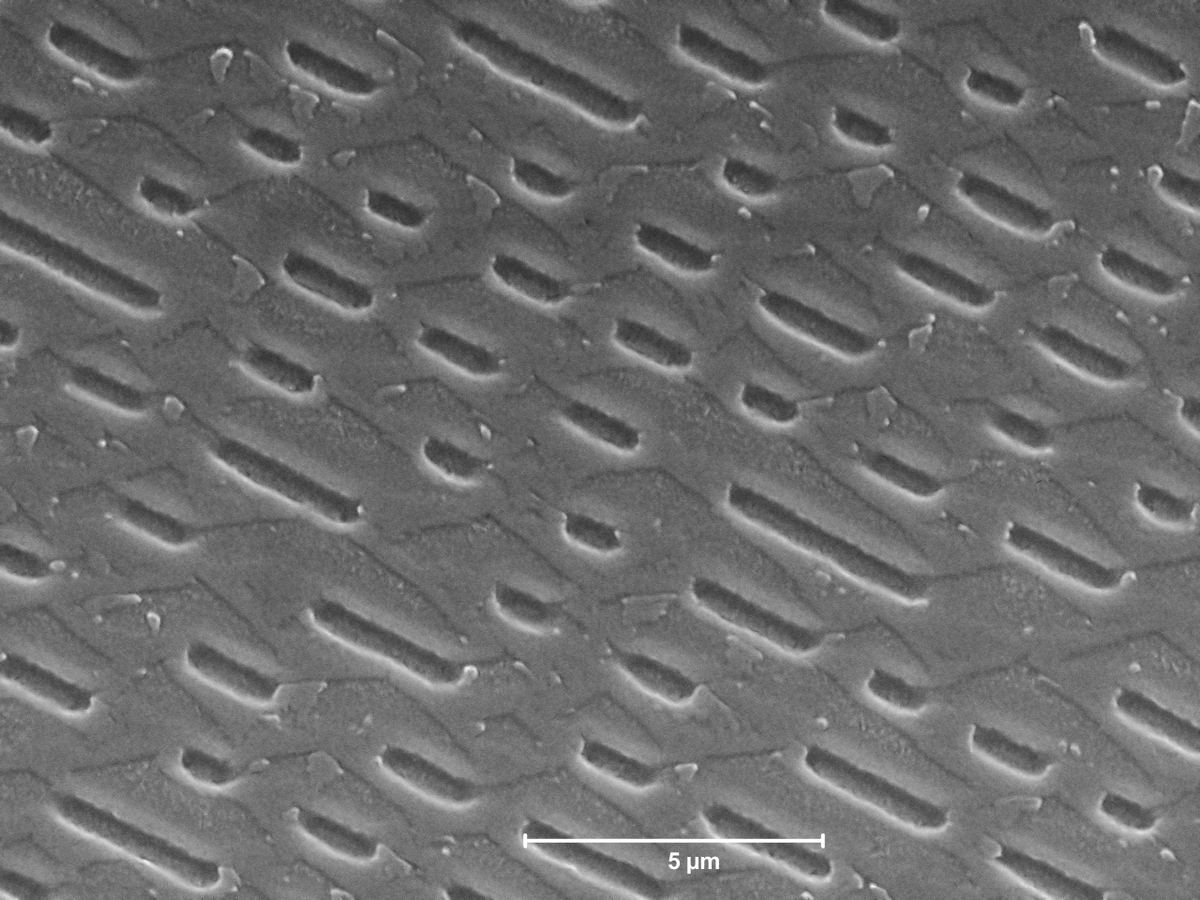
That redundancy is why a small scratch or speck of dust rarely produces an audible glitch. The correction system can reconstruct data that the laser could not read cleanly, and for most discs in good condition the result is a bit-for-bit recovery of exactly what was pressed. Only when damage overwhelms the correction does the player resort to interpolation — guessing at missing samples — or, in the worst case, an audible skip. For the vast majority of playback, what leaves the transport is the same data that went onto the master.
Getting the Data to the DAC
Once the transport has recovered the bitstream, it has to hand it off. Three digital interfaces do that job in home audio, and they carry the same underlying 16-bit/44.1kHz data — they differ in the physical medium and in their susceptibility to timing noise.
S/PDIF Coaxial
An electrical connection on an RCA (or sometimes BNC) jack, carrying the digital stream as a voltage over a 75-ohm cable. It comfortably handles CD's 44.1kHz data and is the most common transport output. Because it is electrical, it can pass ground noise between components, but its timing performance is generally very good.
TosLink Optical
The same data sent as pulses of light down a plastic or glass fibre. Its headline advantage is galvanic isolation — because nothing electrical passes between the boxes, ground loops and electrical noise are broken at the link. The trade-off is that the optical transmitter and receiver can introduce a little more timing jitter than a good coaxial link, though for CD-rate data this is rarely a limiting factor.
AES/EBU (Balanced Digital)
A professional balanced connection on an XLR, carrying the digital signal over a 110-ohm cable. It offers strong noise immunity and low jitter, and tends to appear on higher-end transports and DACs. For a two-box CD setup it is arguably the most robust option, though its practical edge over a well-implemented coaxial link is modest.
Why "Bit-Perfect" 16-bit/44.1kHz Is Genuinely Good
There is a persistent assumption that CD is a compromised, "low-resolution" format now that high-resolution files exist. That framing is misleading. The CD standard stores audio as 16-bit samples taken 44,100 times per second, and those numbers are not arbitrary. The 44.1kHz sample rate captures every frequency up to roughly 22kHz — comfortably beyond the upper limit of human hearing. The 16-bit depth yields a dynamic range on the order of 96 dB, which exceeds the usable range of nearly every recording and most listening rooms, where background noise alone eats into the bottom of that window.
When a transport recovers a disc without uncorrected errors, the data reaching the DAC is bit-perfect — an exact copy of what the mastering engineer signed off on. There is no lossy compression in the chain and no generational loss. A higher sample rate or bit depth can offer engineering headroom during production, but for playback of a finished stereo recording, a clean 16-bit/44.1kHz stream already carries everything within the range we can hear. The format's reputation as "just CD quality" undersells what is, on its own terms, a transparent delivery of the master.
The mastering point: When two versions of an album sound different — a CD versus the same title on a streaming service — the cause is almost always a different mastering, not the format. Both may be 16-bit/44.1kHz, but the levels, equalisation, and dynamic-range choices can differ between pressings. A specific CD pressing is the reliable way to hold onto an exact mastering you prefer.
Jitter and Clocking
If bit-perfect data is bit-perfect data, why do transports ever sound different? The answer lives in timing. Digital audio is not just a set of sample values; it is a set of sample values that must be converted at precisely even intervals. Jitter is the term for tiny, irregular deviations in that timing — the clock arriving a fraction early or late from one sample to the next. The numbers are correct; the moments at which they are converted are slightly wrong.
Jitter does not sound like a click or a dropout. It tends to smear fine detail, soften the sense of images sitting in space, and add a faint hardness or glare in the treble — the kind of thing you notice more as fatigue than as an obvious flaw. A transport with a noisier output clock hands the DAC a harder job, because the DAC has to lock onto and clean up that timing before conversion.
This is also why the significance of transport quality depends heavily on the DAC downstream. Modern converters with asynchronous reclocking effectively regenerate the timing using their own low-jitter oscillator, largely divorcing the sound from the transport's clock. Feed such a DAC and a modest transport will get you most of the way there. Feed a simpler DAC that slaves directly to the incoming S/PDIF clock, and a cleaner transport can make an audible difference. In practice, a mid-tier transport into a DAC with strong jitter rejection tends to beat an expensive transport into a converter with none.
The Specs That Actually Matter
Comparison sheets for CD players and transports list plenty of numbers. A handful genuinely predict how a unit will perform and integrate.
DAC Chip & Analog Stage (integrated players)
In a one-box player, conversion quality is doing much of the sonic work. The specific converter chip matters less than the analog output stage and power supply built around it — a well-implemented older chip routinely outperforms a premium chip dropped into a noisy circuit. Look for a clean, low-impedance output and a claimed output voltage around 2 V RMS so the player mates sensibly with a typical preamp input.
Digital Outputs (transports)
For a transport, the outputs are the whole point. Confirm which are fitted — coaxial S/PDIF, TosLink optical, AES/EBU — and that at least one matches an input on your DAC. More outputs mean more flexibility, but a single well-implemented coaxial or AES output is enough for an excellent two-box system.
Disc-Reading Mechanism
The transport mechanism is the one part that physically wears. Purpose-built drives with solid vibration isolation read cleanly and last, whereas a repurposed computer drive may struggle with marginal discs and age less gracefully. On used gear especially, a mechanism that has been serviced or still tracks reliably matters more than any spec on paper.
Jitter / Clock Quality
Where a manufacturer quotes it, lower output jitter (measured in picoseconds) indicates a cleaner clock feeding the DAC. It is only half the story — the DAC's own reclocking determines how much the transport's jitter survives to the analog output — but between two transports feeding the same slaved DAC, the lower-jitter unit has the advantage.
Why CD Still Holds Up in the Streaming Era
None of this argues that CD is more convenient than streaming — it plainly is not. You cannot summon ten million albums instantly from a disc, and a large collection eats real shelf space. The case for CD is narrower and more specific, and it rests on a few things streaming genuinely does not offer.
- Actual ownership. A disc you bought is yours without conditions. It cannot be pulled from a catalogue in a licensing dispute, quietly swapped for a different remaster, or gated behind a lapsed subscription.
- No availability churn. Streaming catalogues shift constantly — titles vanish, reappear, or differ by region. A shelf of 500 CDs is always those same 500 albums, and plenty of jazz, classical, and niche recordings remain effectively CD-only.
- Consistent bit-perfect quality. Every play of a given disc delivers the identical bit-perfect data of a known mastering. There is no question of which version a service happened to upload this month.
- Strong used-market value. Players and transports that cost a great deal when new depreciated sharply as listeners moved to streaming, so the second-hand market offers serious performance for modest money — often gear that competes with far pricier current production.
Where CD Fits Alongside Streaming
The honest answer is that CD and streaming are complementary rather than rival. Streaming is unbeatable for discovery, for casual listening, and for reaching music you would never buy outright. CD earns its place for the recordings you care enough about to own permanently and to hear in a specific mastering. Many well-sorted systems in 2026 run both: a network streamer for breadth, and a CD player or transport for the physical library that matters — frequently sharing a single high-quality DAC between them.
There is also a middle path. Ripping your discs to lossless files (FLAC, verified against a reference database like AccurateRip) produces files that are bit-identical to the CD data, letting you keep the mastering certainty and ownership of physical media while gaining software convenience. Whether you keep spinning discs or rip once and play from a server is a workflow preference, not a sound-quality trade-off — both start from the same bit-perfect source.
Quick Reference: CD Players & Transports at a Glance
| Spec / Feature | What It Means | What to Look For |
|---|---|---|
| Player type | Integrated player vs. transport + DAC | Integrated for simple value; split to reuse or upgrade a DAC |
| Digital outputs | How a transport feeds a DAC | At least one that matches your DAC: coax, optical, or AES/EBU |
| DAC / analog stage | Conversion quality in a one-box player | Clean output stage, ~2 V RMS output; implementation over chip name |
| Disc mechanism | The part that physically reads and wears | Purpose-built drive; serviced and reliable on used units |
| Jitter / clock | Timing precision of the digital output | Lower is better; matters most with a DAC that slaves to the source |
| Data integrity | Error correction on 16-bit/44.1kHz audio | Bit-perfect recovery on discs in good condition |
| Format resolution | What the CD standard actually delivers | ~96 dB dynamic range, full audible bandwidth — genuinely high quality |
See how a CD player fits your chain
Enter your CD player or transport, DAC, and amplifier to check digital output matching, gain staging, and overall signal-chain compatibility.
Run a Free Analysis →